Silent Switches For Typing are no longer a niche choice for shared offices and late-night gaming—they are becoming the “default” for people who want a calm, focused keyboard that still feels smooth and responsive.
Why Silent Switches for Typing Matter More in 2026
In 2026, more people type in public or semi-public spaces: open offices, co-working rooms, dorms, home studios, and even live-stream setups. The problem is not only “volume.” It is also the type of sound. Sharp bottom-out and top-out noises travel farther and feel more distracting than you expect.
For beginners, the silent switch category can feel confusing because many “silent” products depend on a simple trick: add padding somewhere and reduce the impact sound. That approach can work, but it often changes the typing feel in ways people do not like. Some pads feel mushy. Some create inconsistency across keys. Some wear over time and make the sound uneven.
At GATERON, we treat silence as an engineering goal, not just a soft material add-on. That is why we built our Zero Degree Switch Fully Silent Set around double mute pads and a stability-first internal structure—so you get lower noise without sacrificing the clean, linear feel that typists value.
The Real Source of Noise: Bottom-Out, Top-Out, and Housing Vibration
A keypress sound is not one event. It is usually three events that happen in sequence:
✓ Bottom-out impact when the stem reaches the bottom
✓ Return/top-out impact when the stem rebounds and hits the top area
✓ Housing vibration that amplifies small impacts into a noticeable “clack”
Traditional silent designs often focus on only one point of contact. They reduce one peak of noise but leave the other peaks untouched. This is why some “silent” switches still sound sharp when you type fast, or still create a bright tick on the release.
For Silent Switches For Typing, the goal is not absolute silence in a lab. The goal is lower peak noise in real typing, where speed changes, finger pressure changes, and long sessions amplify small weaknesses. A truly quiet switch should stay consistent when you type lightly, when you bottom out, and when you move across the board.
How Double Mute Pads Cut Noise Without Killing Smoothness
Our Zero Degree Fully Silent design “overthrows” the traditional silent structure by solving a common issue: external padding limitations. When padding is applied in a way that fights the natural motion of the stem, the result is friction, drag, or a soft collapse that feels less precise.
Instead, we designed silence into the motion path itself.
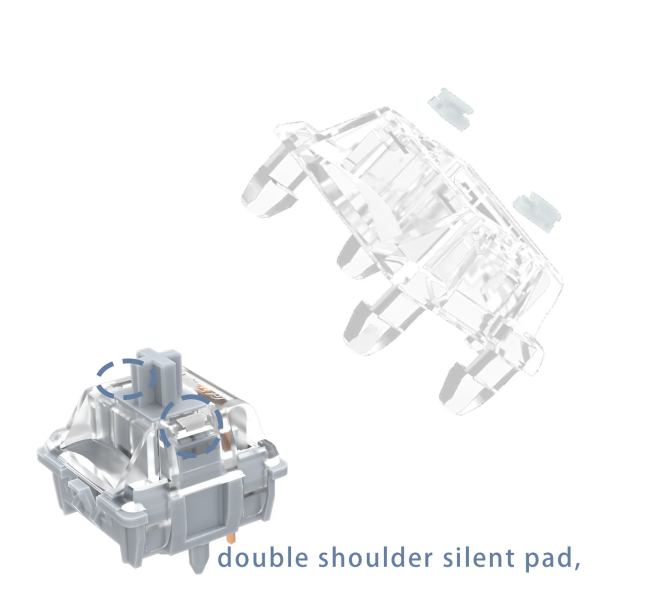
Rebound Double Shoulder Mute Pads
The first part is rebound double shoulder mute pads, placed where they can manage return noise and rebound energy. Think of it as controlling the “echo” of a keypress. Many switches get quieter on the way down, but still produce a noticeable sound when the key comes back up. That return sound is especially obvious in fast typing.
With rebound mute pads, the key release is damped in a controlled way, which helps:
✓ Reduce the sharp “upstroke” tick
✓ Keep the return feeling stable, not sticky
✓ Maintain a clean rhythm for fast typists
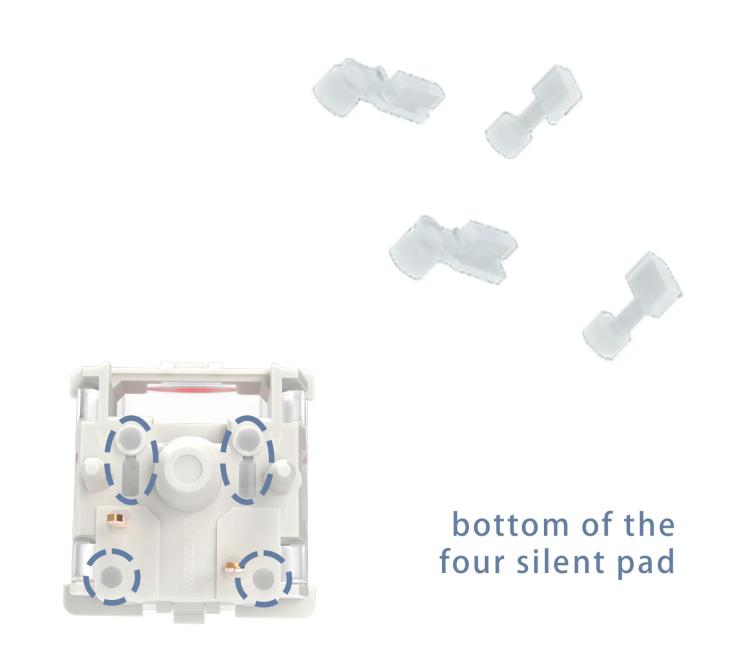
Bottom-Touch Mute Pads
The second part is the bottom-touch mute pad design, which targets the impact at the end of travel. This is where most people hear the loudest “thock/clack” depending on keyboard build.
By softening the impact point rather than slowing the stem motion, we reduce bottom-out noise while keeping the glide smooth. The result is the typing feel many users describe as soft and bouncy—not because the switch is vague, but because the impact is absorbed instead of reflected as noise.
In short: double mute pads = silence on the way down + silence on the way up, which is what many beginners expect “silent” to mean, but do not always get.
Stability Makes Silence Better: Double Rail and 5-Pin Support
Silence is not only about pads. A switch that wobbles produces micro-movements, and micro-movements create micro-sounds. Over a full keyboard, those small noises add up.
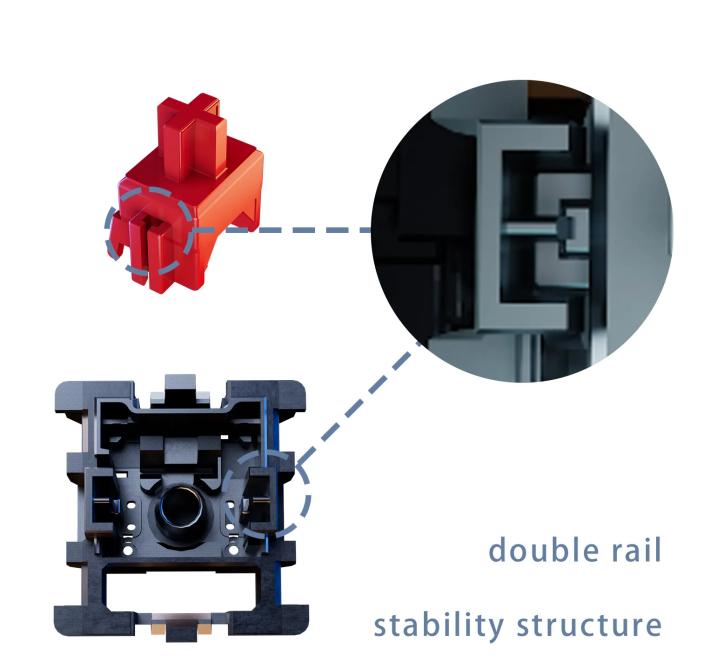
GATERON Zero Degree Fully Silent uses a double rail stability structure to guide the stem with more control. For typists, this matters because the keypress feels consistent even if you do not press perfectly centered.
We also use a 5-pin design, which supports stronger mounting stability on compatible PCBs. Less movement at the base means fewer vibration paths into the plate and case.
Another detail is the three-layer pin structure concept in the design direction: stability that is hardened but not thickened. In practice, this is a way of saying we pursue firmness and alignment without forcing the switch to feel heavy or rigid. A stable switch can still feel light and smooth.
If you are building Silent Switches For Typing for shared environments, stability is not a “premium extra.” It is what helps the keyboard stay quiet across different keys, different angles, and long sessions.
A Practical Spec Breakdown for Beginners
Specs are only useful if you know what they do for your hands. Here is what matters in daily typing with the Zero Degree Fully Silent Set:
Linear means a smooth press with no tactile bump. Many typists choose linear silent switches for speed and low fatigue, especially in long writing sessions.
This sits in a comfortable middle zone for most users. It is light enough for fast typing, but not so light that it feels uncontrolled. The tolerance range is also a reminder that real mechanical parts vary slightly, which is why structural stability matters.
- Pre-Travel: 1.8±0.5mm | Total Travel: 3.6mm Max
Pre-travel affects when the switch actuates. Total travel affects how the press “finishes.” In silent typing, travel length matters because it changes how often you bottom out. With proper damping, even bottoming out can stay calm.
- 20mm Spring Length + Pre-Lubed
A well-matched spring supports a consistent return. Pre-lube helps reduce scratch and high-pitched friction noises that can appear in dry switches. For beginners, factory pre-lube is also a simple way to get a smoother experience without learning modding first.
- Materials: POM Stem, PC Top, Nylon Bottom
Material choices affect smoothness and sound tone. POM is known for low friction. PC and nylon are common for balancing clarity, durability, and sound control in modern switch builds.
- Switch Life: 100,000,000 Cycles
This is a durability signal. For daily typists, it means the switch is built for long-term consistency, not short-term novelty.
How To Choose Silent Switches for Typing and What to Do Next
If you are new to Silent Switches For Typing, do not start with marketing words like “silent” or “thock.” Start with your environment and your typing habit.
✓ If you type at night or share a room, prioritize bottom-out and return noise control (double mute pads help here).
✓ If you type fast, prioritize stability (double rail + solid mounting reduces noise drift).
✓ If you do not want to mod, prioritize pre-lube for smoother sound and feel out of the box.
At GATERON, we built the Zero Degree Switch Fully Silent Set for people who want a keyboard that stays calm without feeling slow or dull. It is designed to reduce noise in a realistic way—by controlling impact points, stabilizing motion, and keeping the stroke smooth.
If you are planning a quiet build for 2026, now is a good time to test silent switching the right way. Contact GATERON to request samples, ask about OEM/ODM options, or get a recommended configuration for your keyboard layout and use case.



